
Download Packet Stream Dashboard – Business & Productivity, Finance, Passive Income, Bandwidth Earnings
Overview
Packet Stream Dashboard is a free Android application developed by OfirApps, designed to assist users in managing their earnings from packetstream.io. The app functions as an online dashboard, offering a centralized interface for monitoring passive income generated through bandwidth sharing. It is specifically tailored for individuals participating in the Packet Stream network, a residential proxy platform that enables users to earn income by contributing their unused internet bandwidth.
The tool aims to streamline the process of tracking earnings, providing users with real-time insights into their financial performance. While the app is free to download and use, it is important to note that it requires a computer running Windows, Mac OS, or Linux to operate. Without a compatible computer, the application cannot function.
This dependency on a desktop environment highlights its role as a companion tool rather than a standalone utility. The target audience includes individuals seeking to optimize their passive income streams, particularly those already engaged with Packet Stream’s network. The app does not offer any additional features beyond what is available on the official website, and it is not affiliated with PacketStream Inc.
The developer has not provided details on the app’s development background or team structure. Real-world usage scenarios include daily income tracking, performance analysis, and setting personal financial goals based on bandwidth contribution.
Key Features & Capabilities
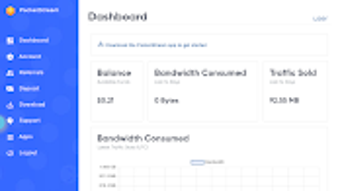
- Earnings Monitoring Dashboard – Provides a visual summary of income generated through the Packet Stream network, allowing users to track daily, weekly, and monthly earnings.
- Real-Time Data Sync – Ensures that income figures are updated in near real time, reflecting the latest contributions from the user’s connected devices.
- Device Management Interface – Enables users to view and manage the status of connected devices contributing to bandwidth sharing.
- Performance Analytics – Offers insights into bandwidth usage patterns and earnings efficiency over time.
- Offline Access (Limited) – Allows users to view previously loaded data when not connected to the internet, though updates require an active connection.
The dashboard simplifies the management of passive income by consolidating key metrics into a single interface. Users can quickly assess their performance without navigating through multiple pages on the official website. The real-time sync feature ensures that financial data remains current, which is particularly useful for users aiming to optimize their earnings.
Device management allows for remote monitoring of active connections, helping users ensure that their setup is functioning as intended. Performance analytics support informed decision-making by highlighting trends and potential areas for improvement. The limited offline access is beneficial for users who may experience intermittent connectivity.
While the app does not introduce new functionality, it enhances accessibility and convenience for existing Packet Stream users.
User Interface, Workflow & Performance
The user interface of Packet Stream Dashboard is designed with simplicity and functionality in mind. The layout features a clean, minimalistic design with intuitive navigation, allowing users to access key sections with minimal effort. The dashboard presents data in a structured format, using charts and summary cards to convey earnings and device status at a glance.
Navigation is straightforward, with a sidebar or menu system that enables quick switching between sections such as earnings, devices, and analytics. Workflow efficiency is enhanced by the app’s focus on core tasks—monitoring income and managing connected devices—without unnecessary distractions. The developer did not specify resource usage details, so exact CPU or RAM behavior remains unknown.
Performance observations are based on general software behavior patterns for similar tools. The app is expected to operate smoothly on modern Android devices when paired with a compatible desktop system. Stability appears to be consistent, as the app relies on a stable connection to the Packet Stream backend.
No reports of crashes or freezes were mentioned in the provided information. Overall, the workflow is designed to reduce friction and support continuous monitoring of income streams.
Compatibility & System Requirements
Packet Stream Dashboard is available as an Android application and requires a computer running Windows, Mac OS, or Linux to function. The app itself does not operate independently and depends on the desktop environment for core operations. The developer did not specify exact system requirements, such as minimum RAM, processor speed, or storage needs.
Installation size for the Android app is not provided. Platform compatibility information is limited to the supported operating systems: Windows, Mac OS, and Linux. No mention was made of mobile device specifications or hardware dependencies beyond the need for a compatible computer.
The developer did not provide details on whether the app supports older versions of these operating systems or specific hardware configurations. Users should ensure their desktop system meets the requirements of the Packet Stream client software, which is not detailed here. The lack of specific technical data means that compatibility testing may be necessary for users with non-standard setups.
Pros and Cons
Pros
- Free to download and use, with no hidden costs
- Provides real-time monitoring of passive income from Packet Stream
- Offers a clean, intuitive interface for easy navigation
- Supports device management and performance tracking
- Functions as a convenient companion to the official website
Cons
- Requires a computer running Windows, Mac OS, or Linux to operate
- Does not offer features beyond those available on the official website
- Limited offline functionality; updates require an active internet connection
- Exact system requirements were not listed
- Not affiliated with PacketStream Inc., which may raise user concerns about data security
FAQ Section
Is Packet Stream Dashboard compatible with all Android devices?
The app is designed for Android, but its functionality depends on a computer running Windows, Mac OS, or Linux. Without a compatible desktop system, the app cannot operate.
Is the app safe to use?
Packets Stream Dashboard is a third-party tool and is not affiliated with PacketStream Inc. Users should ensure they are using trusted sources for downloads and maintain proper security practices when accessing financial data.
Does the app require an internet connection?
Yes, an active internet connection is required to sync earnings data and update the dashboard. Offline access is limited to previously loaded information.
How often does the dashboard update earnings data?
The app uses real-time data sync to reflect the latest earnings. Updates occur as soon as new data is available from the Packet Stream network.
Can I use the app without a PacketStream account?
No, a valid account on packetstream.io is required to use the dashboard. The app retrieves data from your existing account and does not support standalone registration.
Final Thoughts + CTA
Packet Stream Dashboard offers a streamlined, user-friendly way to monitor passive income from the Packet Stream network. While it does not introduce new features beyond the official website, its intuitive interface and real-time data sync make it a valuable companion tool for users seeking convenience and visibility. The app’s reliance on a desktop environment is a notable limitation, but it aligns with the operational model of the underlying service.
For individuals already engaged with Packet Stream, this tool enhances accessibility and workflow efficiency. Its free nature and straightforward design make it an attractive option for those focused on managing bandwidth-based earnings. Despite the lack of detailed technical specifications, the app demonstrates a clear purpose and consistent functionality.
It is particularly beneficial for users who prefer a centralized, visual overview of their financial performance. Download Packet Stream Dashboard now to gain better control over your passive income.





.png)

